The Portalink™AnyOrder app’s Business Rules system provides automated validation for orders received through email. When customer purchase orders arrive as email attachments, the system automatically extracts order data and validates it against configurable business rules before creating draft orders in Shopify.
“Validate Order Data Field Values” Business Rule
The system validates that the extracted Order Data includes all required fields, has the correct format, and doesn’t exceed the allowed length. To modify the configuration, perform the following steps:
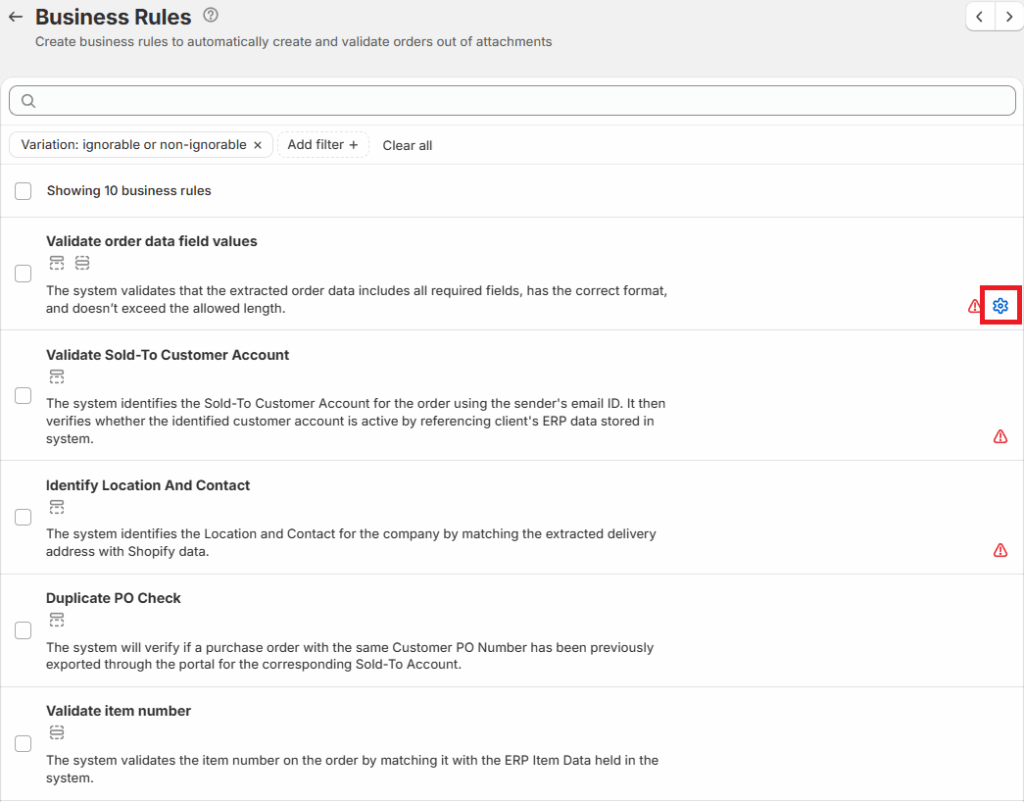
- Navigate to the Business Rules page, and then click on the gear icon under Validate Order Data field values.
Here, the user can set the minimum and maximum lengths and values for the different data fields. You can also tick the Mandatory, Enabled and Ignorable boxes.
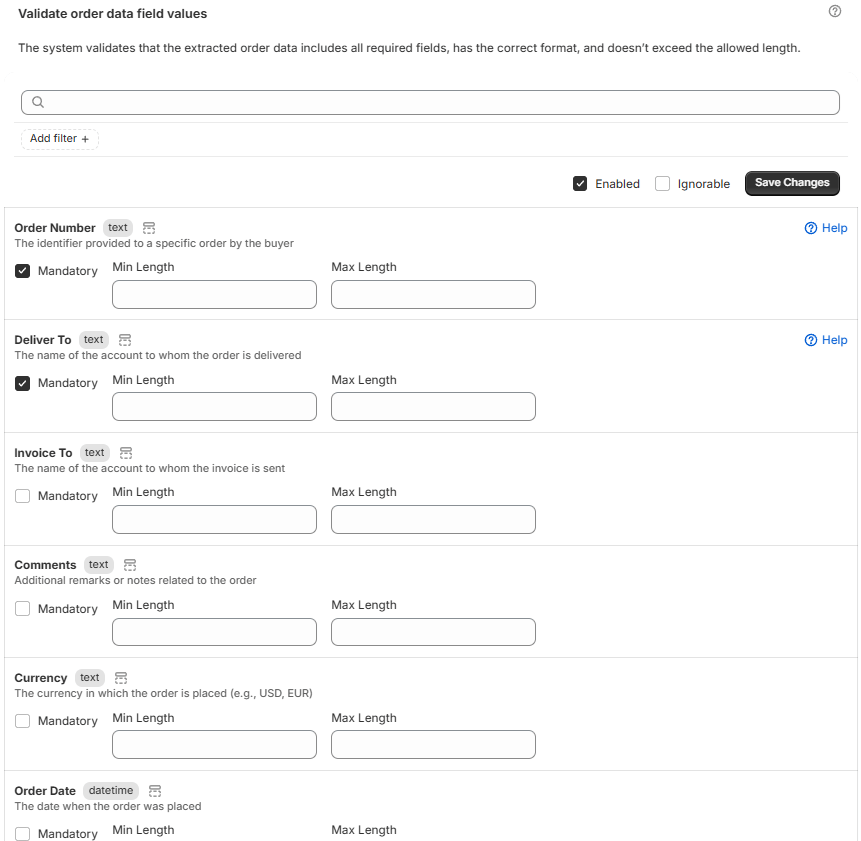
The data fields which can be modified are as follows:
- Order Number – The identifier provided to a specific order by the buyer
- Deliver To – The name of the account to whom the order is delivered
- Invoice To – The name of the account to whom the invoice is sent
- Comments – Additional remarks or notes related to the order
- Currency – The currency in which the order is placed (e.g., USD, EUR)
- Order Date – The date when the order was placed
- Subtotal – Sum of line item totals before tax
- Order Total Tax – The total tax amount applied to the order
- Freight – The shipping or freight cost associated with the order
- Order Total – The total monetary amount of the order
- Business Name – The name of the business or company for order delivery
- Attention – Name of the person to whom the order is directed
- Line 3 – Additional address line for dropship address
- Street – Name of the Street for dropship address
- Zip Code – Zip Code for dropship address
- City – Name of the City for dropship address
- State – Name of the State for dropship address
- Country – Name of the Country for dropship address
- Delivery Instructions – Special instructions for the delivery of the order
- Supplier – The supplier or vendor from whom the order is placed
- Sold to Account Code – The code or ID of the customer/account that placed the order
- Code – A specific product or service code for the line item
- Barcode – The barcode or EAN of the product
- Description – A brief description of the product or service
- Quantity – The quantity of the product or service ordered
- Unit of Measure – Unit of Measure, indicating the unit in which the product is measured (e.g., pieces, kilograms, etc.)
- Price (Exc) – The price of the product or service for a single unit
- Total (Exc) – The total cost of the line item (quantity multiplied by the sales price)
- Customer Code – The code or ID of the customer associated with the line item
- Product Note – Additional notes or comments related to the product
- Tax Value – The tax amount applied to the line item
- Delivery Date – The date when the line item is expected to be delivered
- Line Item Number – A unique identifier for each individual item in the order
- Internal ID Product Code – An internal code or ID used to identify the product within a company’s system
- isProductCodeMapping – Indicates if the product code has been mapped or not
Related article: Business Rules


